The Limits of Media on Blogger
Today's article is going to look at the limits of digital media on this platform
and how it could shape the learning and pedagogy for both student and teacher.
While the platform allows for the obvious aspect of digital media in the
creation or articles and blog posts. Other aspects, namely the creation of
digital media such as videos or audio are limited, or omitted entirely.
 As seen in the picture above, Blogger offers access to online links, photos and
videos. Links can extend to other websites, allowing the option for the teacher
to embed other articles or websites which students can access when looking for
definitions to words, or to offer extended reading options. In doing so students
can research and explore subjects further, or the teacher can embed additional
knowledge which while not mandatory offers the ability to deepen understanding.
In addition, videos and images can be embedded however these must come from
outside sources.
As seen in the picture above, Blogger offers access to online links, photos and
videos. Links can extend to other websites, allowing the option for the teacher
to embed other articles or websites which students can access when looking for
definitions to words, or to offer extended reading options. In doing so students
can research and explore subjects further, or the teacher can embed additional
knowledge which while not mandatory offers the ability to deepen understanding.
In addition, videos and images can be embedded however these must come from
outside sources.
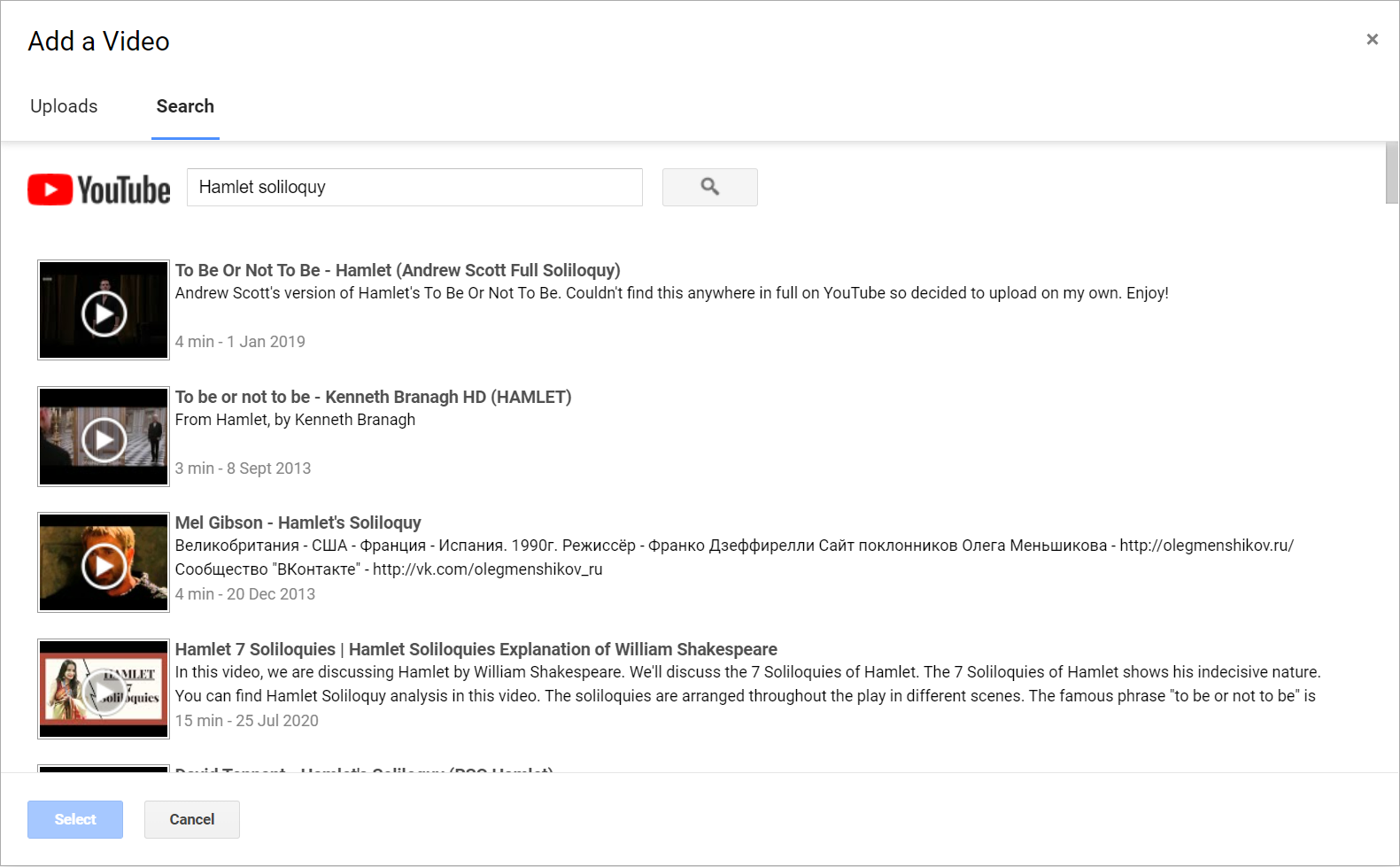
In terms of images, the individual can upload ones already
saved to the computer, or they can find an image address and embed the image via
URL. Similarly for videos the author can upload their own from the computer, or
they can find one via youtube and embed it in the article. While finding the URL
and listing the Youtube link are easier and quicker, one is left to the whim of
the internet. Namely, if those images or videos were to be removed, then the
images and video would no longer work on the blog post. While uploading from the
computer is more time consuming, it offers a long-term solution and minimises
the risk of the individuals work being marred by outside circumstances.
 While the act of creating a blog is easy, if students were expected to do
assessments such as perform a presentation and embed that presentation in the
article, they would need to use a variety of other programs to achieve this
effect. Students would need to record using outside technology such as webcams,
performing through PowerPoint, or they may video themselves and then upload the
video to their computer before then uploading it to the article. In considering
these aspects, Blogger is as its named, suited for blogging. As a mode of assessment beyond the written word it can be adapted, but the process of doing
so requires the use of multiple mediums for students to be able to successfully
submit assessments.
While the act of creating a blog is easy, if students were expected to do
assessments such as perform a presentation and embed that presentation in the
article, they would need to use a variety of other programs to achieve this
effect. Students would need to record using outside technology such as webcams,
performing through PowerPoint, or they may video themselves and then upload the
video to their computer before then uploading it to the article. In considering
these aspects, Blogger is as its named, suited for blogging. As a mode of assessment beyond the written word it can be adapted, but the process of doing
so requires the use of multiple mediums for students to be able to successfully
submit assessments.
For students to use Blogger for multimedia elements, the
best way to secure their safety would be for them to upload videos, images, and
audio from their own computers instead of embedding them via online sources such
as Youtube. In doing so, the student reduces their digital footprint and allows
the teacher to safely monitor their online use and maximise their safety.
Students may forget to update their privacy settings on Youtube for example and
while Blogger can be kept private, indiviudals would be able to publically
access the students through YouTube resulting in a lack of security.
Blogger can
be used for assessments related to the use of digital media but it requires a
lot of additional work related to other platforms in order to integrate it
effectively. Primarily it should be used for written assessments, such as
articles and blog posts. However, there could be ways in which it could be used
for multimedia/hybridised assessment. Students could for example upload a video
of a re-enactment, and use the blog to write down the transcript. Such a way
would use the aspects of Blogger in embedding the video, while focusing on what
it does best, namely the creation of articles and written texts.
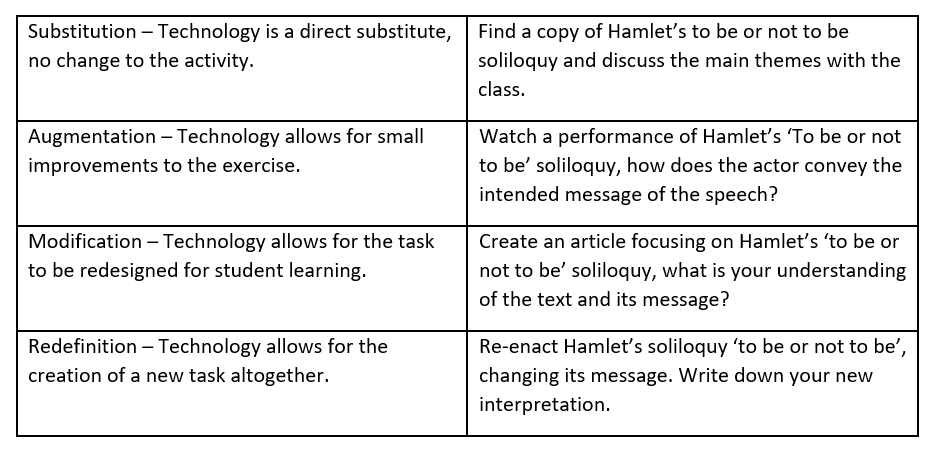
Below is an
example of a creating a digital assessment using the SAMR system:

Greetings, Jayden.
ReplyDeleteI enjoyed reading your post very much. The summarisation of linking images and video was very succinct and delivered everything a potential user needed to know quickly. You've provided a good example as to why students should upload images and videos via saved sources rather than URLs - this is important information that could be overlooked. Your suggestion of utilising blogger in tandem with other programs would enable students to get really creative with their entries - sustaining student engagement. You could have mentioned some of bloggers functions that enable the user to make their blog more user friendly; such as: bloggers function to add additional apps, the blog layout function, or the customise theme function.
Really enjoyed reading your work, Jayden. Thanks for being so active on the CQU forum, too.
Kind regards, Thomas Waltham.
Hi Jayden,
ReplyDeleteAnother great post! I agree with Thomas that everything was super clear and easy to understand. I feel like I'm a novice with a lot technology, but I have definitely also noticed that when videos are linked from YouTube rather than embedded from a saved file they sometimes disappear or don't work properly. I have seen that happen a lot even on our university Moodle site and it can be very frustrating!
I also enjoyed your SAMR model examples for this week - I thought that maybe for the redefinition level where you have students re-enacting the play, they could actually record themselves and upload the video to their own personal blogs so that other students can see and comment on it.
This reminded me of a cool activity I saw on one of my placements to help students remember the plot to Shakespeare's play 'The Tempest'; my mentor teacher got them to create photographs of each of the major plot points. The students worked in small groups and used the costumes and props from the drama department to help represent the characters. They were given digital cameras and were allowed to use the garden outside to take pictures. It was a very fun lesson and the act of recreating major scenes really helped cement the plot of the play in their minds.
Can't wait to read your next post!
Juliet
Hi Jayden
ReplyDeleteI enjoyed reading your post. You introduced me to the term "digital footprint." I had not considered the implications of this for monitoring student safety and privacy on the internet and am glad you highlighted it. You have a raised a really good point here. I am also interested in debates around the extent to which schools should have strict firewalls and limitations on what students can access on the internet because, in the real world, students have broad digital footprints. That is more of a school policy decision and not directly what you are discussing but it raised that issue in my mind.
I loved the suggestion of students being able to watch a Shakespeare performance instead of just reading the script. I could not gauge how your suggestions for modification and redefinition utilised digital technology because they sound like tasks students could do without technology. Perhaps you could explain how students can record and share the presentations with one another for feedback or creative editing, like telling the story with contemporary music as the soundtrack. Something that came to mind when I read your suggestion that students watch a video of a Hamlet speech is how ubiquitous Shakespeare and Hamlet is in pop culture. What if we transformed the study of Shakespearean texts by students seeking out and analysing representations of it in pop/internet culture. Imagine if instead of students acting out a traditional scene, they made a TikTok video or Snapchat Story from the point of view of a character in the play?